This article explains how to build and package the Headscale source code yourself, and covers common errors that may occur during the build process along with their solutions.
OS: Windows 11 Home (Chinese edition); WSL 2 with Ubuntu 24.04 LTS. The build was performed on Ubuntu 24 installed via WSL 2.
Source directory: C:\Users\XXX\Documents\develop\0me\headscale. Source code stored on the Windows filesystem.
It is recommended to clone the repository using git rather than downloading a zip archive. When I tried to build from a zip archive, many errors appeared. I was ultimately able to produce an executable via go build -o headscale ./cmd/headscale, but make build could not complete successfully.
Use the following commands to download the source:
Then restart WSL. This allows the Ubuntu environment to share your host machine’s VPN connection — which is required during the build, as many dependencies need to be downloaded from the internet.
Installing Nix
Install the Multi-user edition of nix using the root account.
1
sh <(curl --proto '=https' --tlsv1.2 -L https://nixos.org/nix/install) --daemon
Switch from the root account to a regular user account before building.
1 2 3 4 5 6 7 8 9 10 11 12 13 14 15 16 17
# Enter the directory. Windows paths are accessible under /mnt/c/ in WSL cd /mnt/c/Users/XXX/Documents/develop/0me/headscale
# Set up the build environment nix develop
make generate make test make build
# Check the output ls -la result/
# Verify the version cd ./result/bin ./headscale version # prints the version number
Setting up the environment takes a while — please be patient.
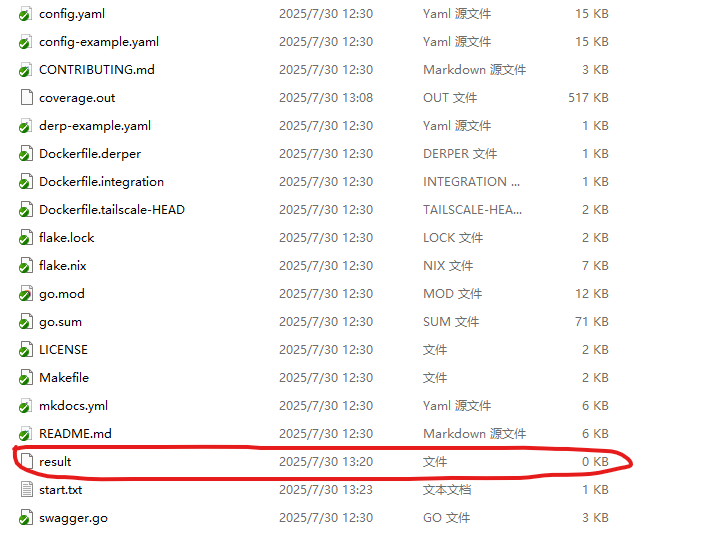
Once make build completes successfully, a result directory will appear in the project folder. When viewed from Windows it appears as a 0 KB file, but it is actually a directory in the Linux filesystem.
Running
The compiled headscale binary can be run directly on the development machine. The following describes how to copy it to another server and run it there.
From the console output above, we can see that headscale requires /nix/store/vbrdc5wgzn0w1zdp10xd2favkjn5fk7y-glibc-2.40-66/lib/ld-linux-x86-64.so.2 at runtime. This path is symlinked to /lib64/ld-linux-x86-64.so.2. For the program to run correctly, you need to manually create the /nix/store/vbrdc5wgzn0w1zdp10xd2favkjn5fk7y-glibc-2.40-66/lib/ directory and copy ld-linux-x86-64.so.2 into it.
In addition, a config.yaml file is required, along with the directories /root/.headscale/ and /var/lib/headscale/, which must be created and granted appropriate permissions.
1 2 3 4 5 6 7 8 9 10 11 12
# Start command: headscale serve

ubuntu@VM-16-7-ubuntu:~/doc/headscale$ sudo ./headscale serve
2025-08-05T17:20:01+08:00 INF Opening database database=sqlite3 path=/var/lib/headscale/db.sqlite
2025-08-05T17:20:01+08:00 INF Using policy manager version: 2
2025-08-05T17:20:01+08:00 INF Starting Headscale commit=6b6daf389bd11624c4036de525740a0568d5f72f-dirty version=6b6daf3-dirty
2025-08-05T17:20:01+08:00 INF Clients with a lower minimum version will be rejected minimum_version=v1.62.0
2025-08-05T17:20:01+08:00 INF github.com/juanfont/headscale/hscontrol/derp/server/derp_server.go:106 > DERP region: {RegionID:999 RegionCode:headscale RegionName:Headscale Embedded DERP Latitude:0 Longitude:0 Avoid:false NoMeasureNoHome:false Nodes:[0xc00051a090]}
2025-08-05T17:20:01+08:00 INF github.com/juanfont/headscale/hscontrol/derp/server/derp_server.go:107 > DERP Nodes[0]: &{Name:999 RegionID:999 HostName:124.232.181.156 CertName: IPv4:124.232.181.156 IPv6:2406:da18:d4c:c000:8d2b:1775:f73f:7c2f STUNPort:3478 STUNOnly:false DERPPort:8081 InsecureForTests:false STUNTestIP: CanPort80:false}
2025-08-05T17:20:01+08:00 INF STUN server started at [::]:3478
2025-08-05T17:20:01+08:00 INF listening and serving HTTP on: 0.0.0.0:8080
2025-08-05T17:20:01+08:00 INF listening and serving debug and metrics on: 0.0.0.0:9090
Packaging as a Docker Image
If you want to package the source into a Docker image, refer to the following link:
# Following the official build steps with nix. make test succeeds, but make build fails with the error below: djc@jetron-djc:/mnt/c/Users/DJC/Documents/develop/0me/headscale-0.26.1$ make build nix build error: … while calling the 'derivationStrict'builtin at <nix/derivation-internal.nix>:37:12: 36| 37| strict = derivationStrict drvAttrs; | ^ 38|
… while evaluating the derivation attribute 'name' at /nix/store/qmm7hgw60vp7vj9lma95hl329d0j3n6n-source/pkgs/stdenv/generic/make-derivation.nix:438:13: 437| // (optionalAttrs (attrs ? name || (attrs ? pname && attrs ? version)) { 438| name = | ^ 439| let
(stack trace truncated; use '--show-trace' to show the full, detailed trace)
error: attribute 'dirtyShortRev' missing at /nix/store/wrx2gzxp6f5sdha4kswnpn6j8sqmfbnk-source/flake.nix:15:41: 14| }: let 15| headscaleVersion = self.shortRev or self.dirtyShortRev; | ^ 16| commitHash = self.rev or self.dirtyRev; make: *** [Makefile:20: build] Error 1
Solution:
Edit the flake.nix file.
Change headscaleVersion = self.shortRev or self.dirtyShortRev; to:
1
2
3
4
5
headscaleVersion = if self ? shortRev
                  then self.shortRev
                  else if self ? dirtyShortRev
                  then self.dirtyShortRev
                  else "v0.26.1";
root@jetron-djc:~# nix develop path '/root' does not contain a 'flake.nix', searching up error: could not find a flake.nix file
This error occurs because nix develop must be run from a directory that contains a flake.nix file. cd into your project directory and run nix develop from there.
Issue 5
1 2 3 4
=== Failed === FAIL: hscontrol/db TestConstraints/no-duplicate-username-if-no-oidc-postgres (0.05s) db_test.go:404: start postgres: initdb: initdb: error: cannot be run as root initdb: hint: Please login (using, e.g., "su") as the (unprivileged) user that will own the server process.
This error occurs because PostgreSQL’s initdb command cannot be run as root for security reasons. The test code attempts to initialize a database as root, which is rejected. Run make build as a regular (non-root) user.
Installing Dependencies Manually
1 2 3 4 5 6
# Install Buf go install github.com/bufbuild/buf/cmd/buf@v1.55.1