Turning an Idle Oracle Cloud ARM Server into a CI/CD Hub: A hermes-agent Field Report
Recently, I built a documentation site for my new product, Larktun. The source code is hosted publicly on GitHub, and the day-to-day workflow is simple enough: edit the docs on my desktop or laptop, preview the changes locally, and push the update to GitHub.
The awkward part was deployment.
For a while, I had been deploying the site manually. It was not because I disliked automation. The real issue was that the production server is relatively small, and I did not want to run Node dependency installation, frontend builds, and deployment scripts directly on it. I also did not have a spare Jenkins-like server sitting around.
At the same time, I had applied for a free Oracle Cloud ARM server. The machine has 4 cores and 24 GB of memory, which is quite generous for a small personal setup. Leaving it idle felt like a waste.
So I started thinking: could this idle server become my automation hub? The actual website would still be served by the production server, but repository mirroring, CI pipelines, builds, and deployment orchestration could all happen on the Oracle Cloud box.
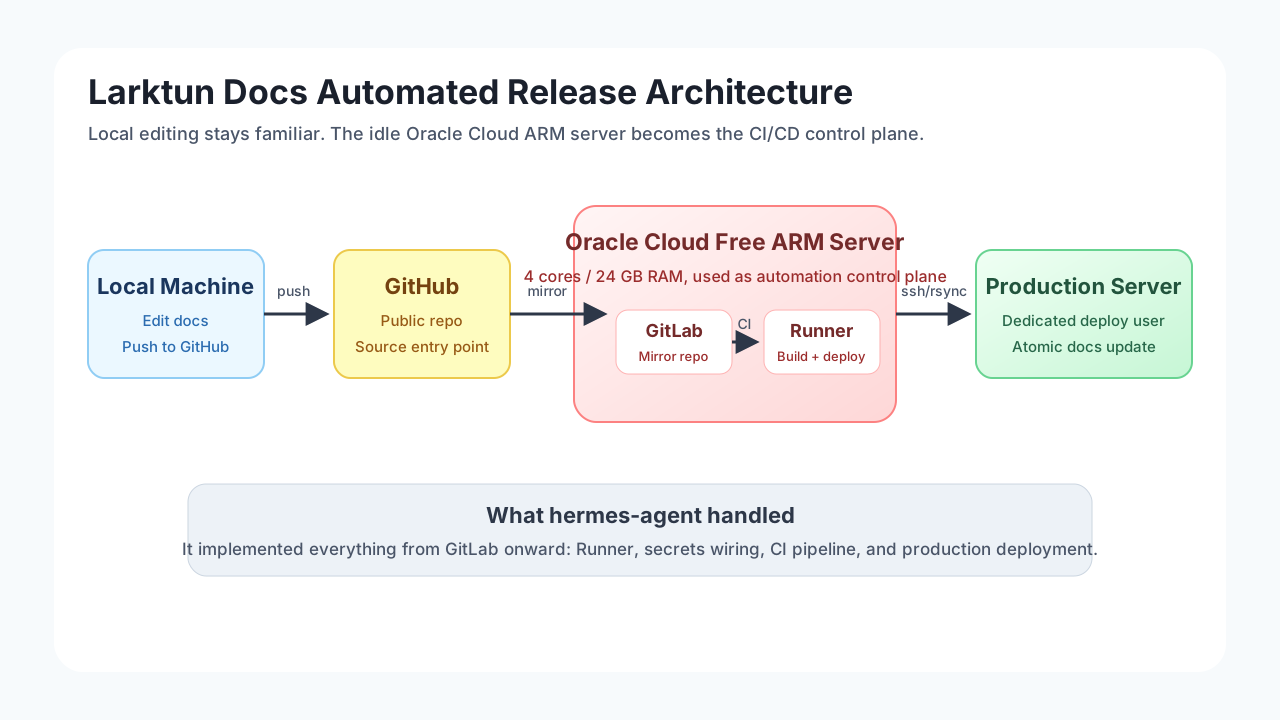
This time, I did not build everything manually from scratch. I let hermes-agent take over most of the work, from refining the plan to implementing the environment. My hermes setup is connected to ChatGPT and uses the gpt-5.4 model. The final flow looks like this:
Local docs update -> GitHub -> GitLab -> GitLab Runner -> deploy -> production server update -> release succeeds
Why Not GitHub Actions
For a public documentation site, GitHub Actions would normally be an obvious choice. In this case, however, it was not a good fit. The documentation site is deployed to a formal production server, and that server is under strict security controls. I cannot casually grant an external CI system direct access to the production release path.
In other words, GitHub can remain the public source repository, but GitHub Actions cannot become part of the production deployment chain.
My goal was not to pick the most common CI platform. It was to reuse the resources I already had while keeping the production security boundary under control and preserving my existing development habits.
The constraints were roughly:
- The documentation source code already lives on GitHub, and I still want GitHub to remain the public entry point.
- The production server has limited resources, so it should not install dependencies, build the frontend, or run CI workloads.
- The free Oracle Cloud ARM server has enough capacity to host GitLab, GitLab Runner, build caches, and automation tasks.
- The production server is a formal environment with strict access controls, so external CI services such as GitHub Actions should not hold deployment privileges.
- Production deployment should be controlled through a dedicated low-privilege account instead of giving CI broad server access.
- The setup should be reusable for other small projects later, not just this documentation site.
The final design therefore does not put everything on the production server, and it does not fully depend on an external CI platform. Instead, the Oracle Cloud server becomes the automation control plane.
The Architecture: GitHub as the Entry Point, GitLab for Automation
The system has two layers.
The first layer is the content and source layer. I still write documentation locally, preview the changes, commit them, and push them to GitHub. That path stays unchanged because it already works well.
The second layer is the deployment automation layer. GitLab is deployed on the Oracle Cloud server and mirrors the documentation repository from GitHub. GitLab Runner watches for updates, triggers the build pipeline, and deploys the generated static files to the production server through a dedicated deploy account.
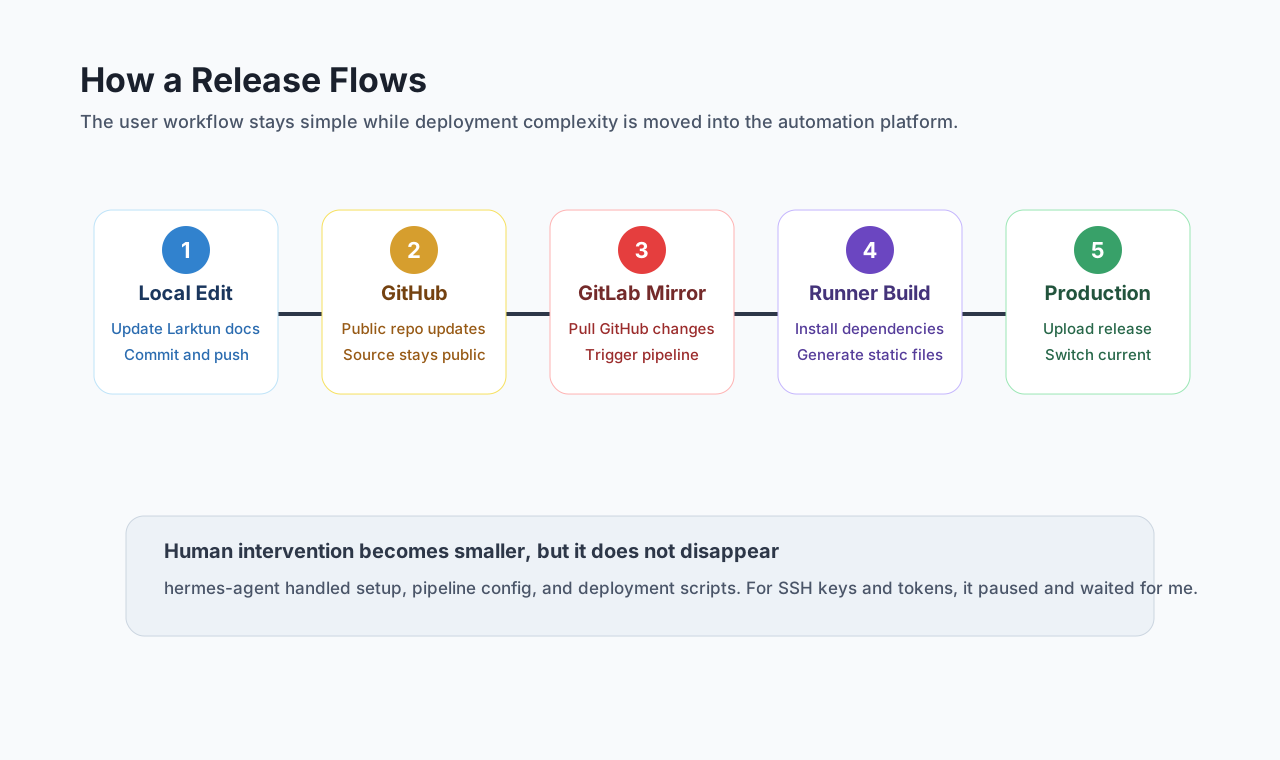
The benefit of this design is clear separation of responsibilities:
| Stage | Responsibility | Where it runs |
|---|---|---|
| Writing and source hosting | Edit docs, commit changes, expose the public source repo | Local machine + GitHub |
| Automation control | Repository mirroring, pipelines, task scheduling | Oracle Cloud ARM server |
| Build | Install dependencies and generate static site output | GitLab Runner |
| Deployment | Upload artifacts and switch the live version | Production server deploy account |
| Serving | Serve the documentation site to users | Production server |
The most important point is that the production server does not build anything. It only receives already-built static files and performs a lightweight release switch.
What hermes-agent Did
I started by giving hermes-agent the situation: I had an Oracle Cloud ARM server, a GitHub repository for the docs site, and a low-resource production server. I wanted automated builds and automated production deployment.
It first helped refine the plan and broke the implementation into stages:
- Prepare the base environment on the Oracle Cloud server.
- Deploy GitLab and configure synchronization from the GitHub repository.
- Install and register GitLab Runner.
- Write the CI pipeline so Runner can install dependencies and build the docs site.
- Create a dedicated deploy user on the production server.
- Configure SSH keys, release directories, and permission boundaries.
- Write deployment scripts that keep the site available during release.
- Run the full chain once and fix issues based on failure logs.
Then it started executing.
One interesting part was how hermes-agent handled sensitive information. Whenever it needed a GitLab token, SSH key, public key installation, production server address, or deploy user details, it stopped and asked me. It did not invent credentials or try to bypass authorization. My role shifted from typing every command to confirming the plan and providing the necessary secrets.
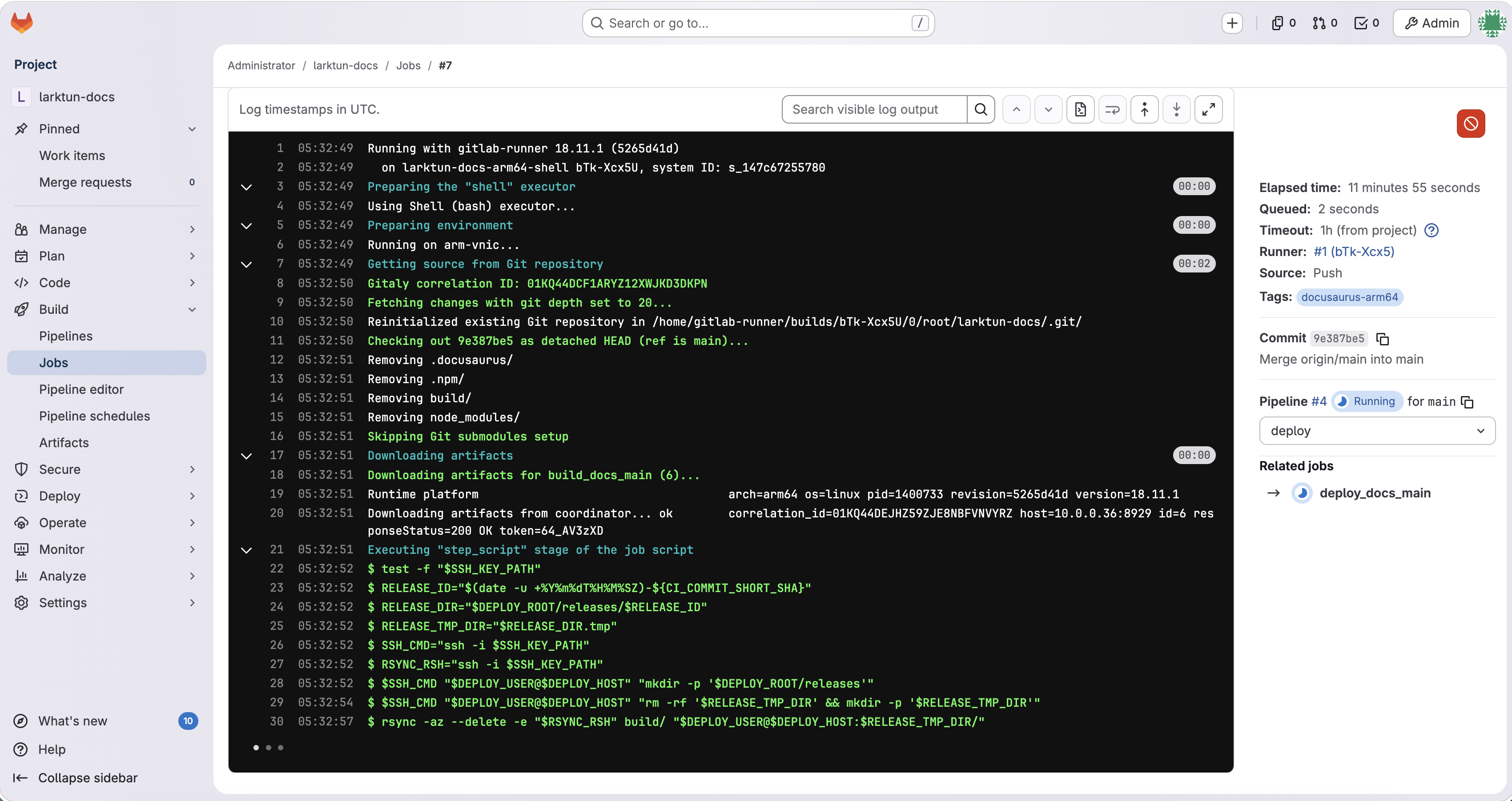
The rest was mostly handled by hermes-agent: installing GitLab, setting up GitLab Runner, configuring repository mirroring, writing the pipeline, debugging the build environment, adjusting deployment scripts, and fixing permission issues until the documentation site could be deployed automatically to production.
Why Deployment Does Not Interrupt the Live Site
My biggest concern was simple: automated deployment must not break the live documentation site.
If files are overwritten directly inside the web root, deployment can briefly leave the site in an inconsistent state. Some files may be new while others are still old. Users can then see missing assets, broken styles, or even blank pages.
A safer approach is to upload the complete build output into a new release directory first, verify that the upload is complete, and only then switch the live pointer. In practice, Runner uploads the static files to a release directory on the production server, for example:
1 | /var/www/larktun-docs/releases/20260426-1130 |
Once the upload finishes, current is switched to point to that new directory:
1 | /var/www/larktun-docs/current -> /var/www/larktun-docs/releases/20260426-1130 |
Nginx or the web server always reads from current. That means a deployment is essentially a fast directory pointer switch, which also makes rollback much easier.
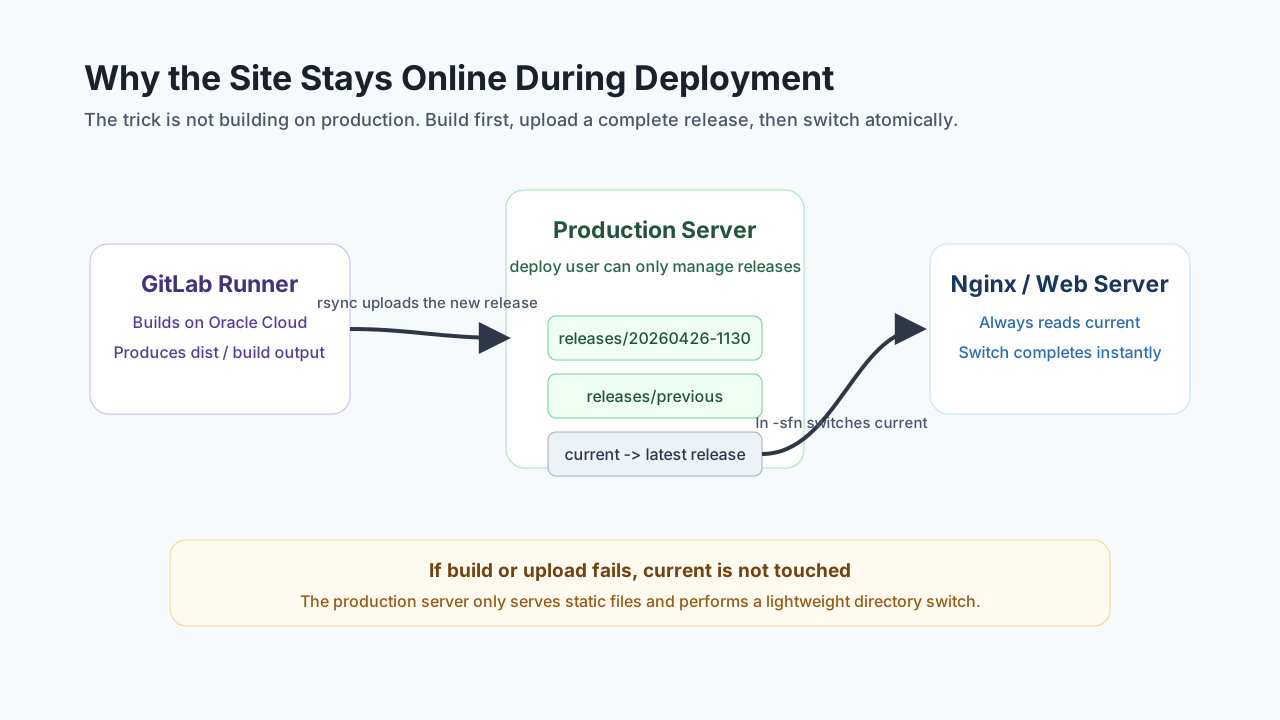
This gives the release flow a useful safety property: if the build fails, nothing is deployed; if the upload fails, current is not touched; only after the new version has fully arrived on the production server does live traffic see it.
What Changed in Daily Use
After the migration, my daily workflow became:
1 | Edit docs locally |
Compared with manual deployment, the biggest improvement is not merely typing fewer commands. The important change is that deployment is now stable, traceable, and reusable.
Before this, manual deployment meant remembering which machine to log into, which commands to run, where the build output should go, how to update the live directory, and what to do if something failed. Now those steps live in the pipeline and scripts, so every release follows the same path.
That is the real value of automation for me: it turns temporary operational knowledge into a repeatable process.
Security Boundaries Matter
Any automation that touches a production server needs a clear security boundary. My approach was to create a dedicated deployment account on the production server instead of using root.
The deploy account only needs permissions for the documentation site’s release directories. It should not be able to modify unrelated parts of the system. The SSH key is also scoped to the deployment workflow, so it can be revoked independently if it leaks or is no longer needed.
At minimum, I would pay attention to these details:
- Use a dedicated deploy user for CI/CD instead of root.
- Separate release directory permissions from broader service or system permissions.
- Store SSH private keys, GitLab tokens, and similar secrets only in GitLab CI variables or other controlled locations.
- Keep several recent releases on the production server so rollback is quick.
- After the first successful run, document the key commands and recovery flow, so the setup does not become a mysterious black box.
hermes-agent can execute a lot of engineering detail, but the final security policy still has to be confirmed by a human. Secrets, permissions, and production access scope are exactly the areas where human judgment should stay in the loop.
How hermes-agent Felt in Practice
This experience made the role of agent-style tools much more concrete for me.
It is not just a chat window that answers questions. It feels more like a remote engineering assistant that can keep pushing a task forward. Traditionally, I might ask separate questions such as “How do I install GitLab Runner?”, “How do I mirror GitHub into GitLab?”, or “How should I deploy with rsync?”, and then stitch the answers together myself. The difference with hermes-agent is that it can start from the goal, turn those pieces into a complete plan, and keep executing until the environment actually works.
That does not mean the human can disappear. My own involvement was still important:
- Clarify the goal: I was not trying to show off infrastructure. I wanted the docs site to deploy reliably.
- Provide context: server specs, repository location, production constraints, and where secrets come from.
- Review the plan: decide whether GitLab, Runner, and the deploy user model fit my maintenance habits.
- Control the boundary: I provide sensitive credentials, and I control production permissions.
- Verify the result: the final test is whether the live documentation site deploys correctly.
This feels like a new kind of collaboration. The human owns the goal, boundaries, and acceptance criteria. The agent takes care of the many tedious but executable engineering steps in the middle.
Conclusion
In the end, this hermes-agent experiment turned an idle Oracle Cloud free ARM server into the CI/CD hub for the Larktun documentation site.
My release chain is now:
1 | Local machine -> GitHub -> GitLab -> GitLab Runner -> deploy -> production server -> release succeeds |
hermes-agent completed most of the work starting from GitLab: deploying GitLab, configuring Runner, mirroring the repository, writing the pipeline, setting up the deployment flow, and handling build and permission issues. Apart from secrets and key permission decisions, which I provided and confirmed myself, the rest was carried forward by the agent.
This is not an architecture that is complex for the sake of complexity. It is a practical setup for solo developers, small teams, and lightweight products: reuse idle resources, turn manual deployment knowledge into a pipeline, and keep build pressure away from the production server.
For me, that is where hermes-agent proved most valuable. It did not decide the product direction for me, but it helped me finally land an infrastructure task that I had wanted to do for a long time and kept postponing because it felt tedious.